


E-PASS Toll App
4.6678.00 Reviews
App Specs
- Version
- 2.25
- Updated On
- License
- Free
- Downloads
- 500,000+
- Developer
- Central Florida Expressway Authority
- Categories
- Business
- Platform
- Android, iOS
Screenshots
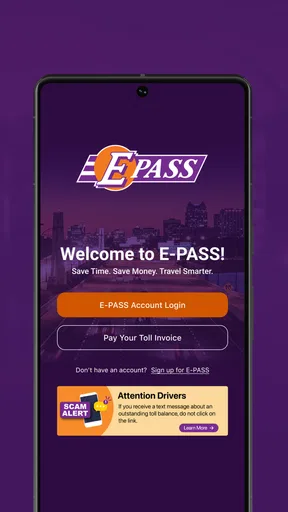
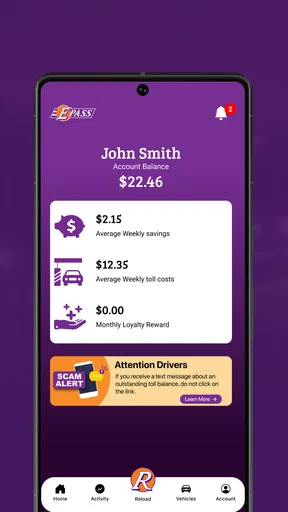
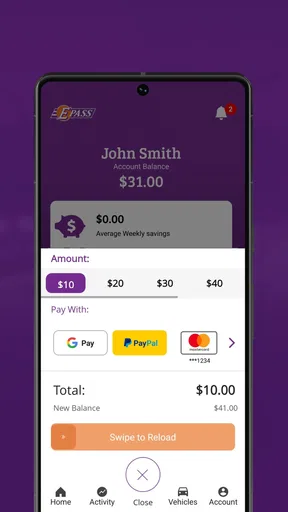
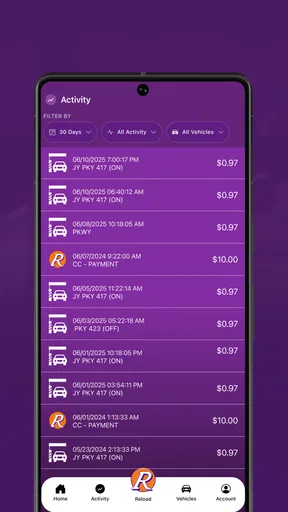
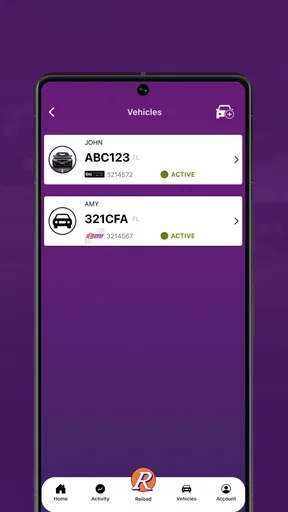
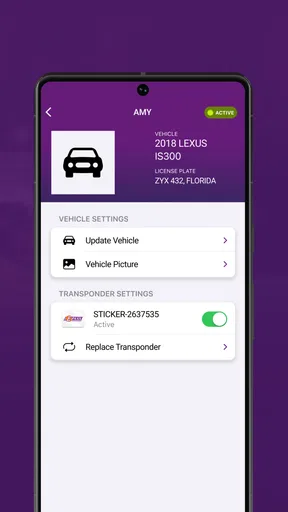
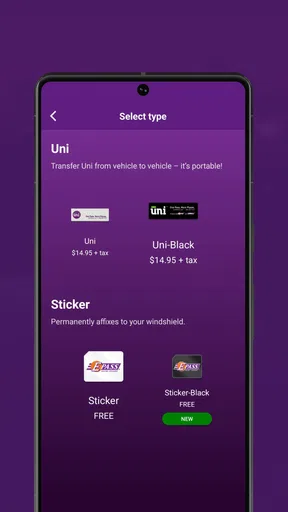
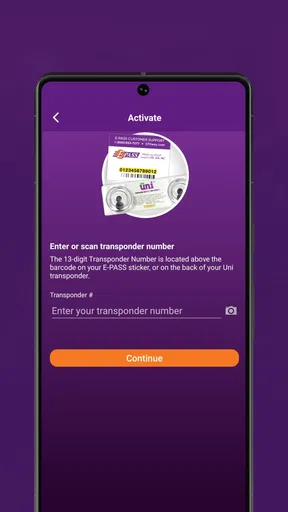
 Analysis by AppCompare
Managing toll travel is one of those tasks I usually want to finish quickly: check whether the account is funded, confirm recent charges, and move on. The E-PASS Toll App is built around exactly that routine. It is a free business app from the Central Florida Expressway Authority that puts an E-PASS account, toll activity, balance, and reloading tools in one mobile place. After spending time with it, I see it less as a travel companion and more as a practical account-control tool for people who regularly use the roads covered by E-PASS.
My recommendation depends on one important question: do you already use E-PASS, or are you deciding how to manage toll payments in general? For an existing E-PASS customer, the app can remove a lot of unnecessary checking through a browser or waiting until a statement arrives. For someone who rarely drives through toll facilities or wants one universal toll solution across different regions, its value is narrower. It is focused, and that focus is both its main strength and its biggest limitation.
What I looked for before recommending it
When I judge a toll-account app, I care about more than whether it can display a balance. I want to know whether it helps me catch an unexpected charge, decide when to reload, and deal with ordinary travel without turning a simple drive into an account-management project. I also look at how well it fits different drivers: commuters, families taking occasional trips, business users, and people who cross between toll systems.
The E-PASS Toll App makes the most sense when the account itself is the center of your routine. Its store summary points to three everyday jobs: monitoring toll activity, checking the account balance, and adding funds. Those are not glamorous features, but they are the details that prevent avoidable account surprises. I found the app easier to evaluate when I treated it as a dashboard rather than expecting navigation, route planning, or a broad travel toolkit.
That distinction matters when comparing it with the usual alternatives. A web account can provide similar account access, but opening a browser, locating the correct sign-in page, and navigating a full site feels excessive when I only want to check a recent toll or confirm available funds. A bank statement can show a completed payment, but it is not designed for quick toll-specific review. A general navigation app may help me choose a route, yet it is not a replacement for the account view itself.
I also consider whether an app is suitable for the whole household. A driver may need fast access before leaving home, while another person may be responsible for keeping the account funded. In that situation, convenience is useful only if everyone understands which account is being checked and why. I would not install this casually for a single trip without first knowing whether the road system and account arrangement match the app’s purpose.
The strongest reason to use it
The clearest advantage is concentration. Instead of treating toll activity as something I discover later, I can make it part of a short pre-trip or post-trip routine. Before a long drive, I can check the balance. Afterward, I can review activity while the journey is still fresh. That timing is more valuable than it may sound because a toll charge is much easier to recognize when I remember where I drove.
Worth Reading Before You Choose

EA SPORTS FC Mobile 26 Is a Bigger Football Game, but It Takes Time

Flipboard Shows What News Apps Must Do Beyond the Feed

Switching to Android Auto Means Rethinking Your Driving Routine

Google Calendar Makes a Crowded Week Easier to Manage

Ludo King Makes the Most of the Minutes Between Plans

Baby Panda World Brings Quick Play to Modern Phones, but Its Game Library Feels Busy
One useful habit is to check the account before leaving for an airport, appointment, or weekend trip rather than waiting until the vehicle is already on the road. If the balance needs attention, I can deal with it while I have time and a reliable connection. I would not treat the app as a substitute for safe driving or use it while moving; its best role is preparation and follow-up.
The activity view is also helpful for separating a genuine account issue from a memory problem. Suppose I take several toll roads during a busy week and later notice a different-than-expected account balance. Looking at the recorded activity gives me a chronological starting point for understanding what happened. That is more actionable than simply seeing that money has been deducted somewhere in a general payment history.
Another practical strength is the reload workflow. I see it as a way to make funding a deliberate task instead of an emergency reaction. A driver who checks the balance on a regular schedule can avoid repeatedly wondering whether the account is ready for the next trip. That is especially useful for people who use toll roads often but do not want to remember every individual crossing.
There is also a behavioral benefit: the app encourages me to treat toll spending as a visible transport cost. If I only notice charges when reviewing a broad financial statement, toll use can disappear among unrelated purchases. A dedicated account view makes it easier to connect the expense with actual driving patterns. That can help a commuter decide whether a faster toll route is worth using regularly, even though the app itself is not a budgeting product.
How I would use it in an ordinary week
Imagine a driver who commutes through toll facilities on weekdays and takes a longer road trip at the weekend. On Monday morning, the first useful action is a balance check, not a deep review. If the account looks ready, there is no reason to spend more time in the app. After several days, the driver can open the activity history and compare the entries with the routes actually taken.
For the weekend trip, I would check the balance before loading the car. If a reload is needed, I would complete it before departure rather than trying to remember it after arriving. On returning home, I would review the activity again, especially if the journey included unfamiliar toll roads. This two-check routine is one of the non-obvious ways the app becomes useful: it turns account management into two small checkpoints instead of one frustrating repair job.
For a household with two vehicles, I would be more methodical. I would avoid assuming that one person’s memory of a trip explains every account entry. Instead, I would compare the activity with both drivers’ journeys and keep the review tied to dates and routes. The app can provide the account information, but the household still needs its own simple process for identifying who drove and why a charge appeared.
Business drivers can benefit from the same approach. If toll travel is part of regular work, checking activity near the end of a work period can make later expense review less confusing. I would still keep whatever records the employer requires, because an account screen is not automatically a complete reimbursement report. Its value here is as a timely reference point, not as a replacement for company accounting procedures.
What the app does better than common alternatives
Compared with using a mobile browser, the dedicated app feels better suited to quick repeat access. A browser account may be perfectly adequate for someone who logs in once every few months, but frequent users benefit from having a purpose-built place for the account. The difference is not that the underlying information becomes more meaningful; it is that the path to checking it becomes more direct.
Compared with calling for account assistance, self-service access is more convenient for routine questions. I would rather inspect activity or a balance myself than spend time asking someone to confirm information that should be visible to me. That said, an app does not eliminate the need for support when an account problem is complicated. It is strongest for ordinary monitoring and funding, not for every possible exception.
Compared with a general-purpose wallet or banking app, the E-PASS tool keeps toll details in context. A bank may show the payment, but not necessarily in a way that makes the road activity easy to understand. The dedicated view is valuable when I need to connect a charge with toll use rather than merely verify that a transaction occurred.
The app also has a clear advantage over doing nothing until a notice arrives. Delayed checking creates a poor feedback loop: I may forget the trip, miss an account issue, or discover a funding problem at an inconvenient time. Regular visibility is the real benefit here. It is modest, but it is directly connected to the problem the app is designed to solve.
Where another option may fit better
I would not choose this app as my main tool if I am looking for a universal toll manager across unrelated agencies. Its identity is tied to E-PASS, so drivers whose travel regularly involves several toll systems may prefer an option that centralizes more of their transportation payments, if such an option suits their roads and accounts. The trade-off is straightforward: a focused agency app can be clearer for its own account, while a broader tool may be more convenient for a mixed travel pattern.
It may also be unnecessary for a driver who uses toll roads only once in a long while. In that case, installing an account app, remembering credentials, and checking it before a rare journey may feel like more work than the occasional trip deserves. A browser session or another official account channel could be enough for that pattern. I would install this app when toll use is recurring, not simply because one upcoming drive might include a toll.
Drivers who expect route planning should set their expectations carefully. This is a business-oriented account app, not something I would open first to compare travel times, find attractions, or plan a scenic drive. A navigation app remains the better choice for those jobs. I would use navigation for the road and E-PASS for the account behind the toll travel.
There is another trade-off for people who prefer managing every financial task in one place. A single banking or budgeting workflow may feel cleaner than maintaining a dedicated toll app. The advantage of the E-PASS approach is detail and immediacy; the disadvantage is another app to maintain. If you rarely need toll-specific information, consolidation may matter more than specialized access.
Small frictions worth considering
The app’s usefulness depends on having an E-PASS account that you can access and understand. That sounds obvious, but it affects the first-time experience. If you are unsure which account credentials apply, or if several household members share responsibility, the app cannot resolve that organization problem by itself. I would sort out account ownership and login details before relying on it during travel.
Reloading also deserves a little discipline. I would not wait until the last possible moment to add funds, particularly before a long drive. Any account-management app is most helpful when used in advance, and a reload screen should not become part of a roadside scramble. The practical lesson is to build a buffer into your routine rather than treating the app as an instant rescue tool.
Activity monitoring can reveal that a charge is unfamiliar, but recognizing it may still require personal context. A household vehicle, a borrowed car, or a trip taken by someone else can make an entry look suspicious at first. I would review the journey details calmly before assuming there is an error. This is one reason I value the app as an investigation aid rather than expecting it to explain every charge automatically.
There is also a natural limit to what a focused account app can do for travel decisions. It can help me see the financial side of toll use, but it does not replace my judgment about whether taking a toll road is worthwhile. I still need to weigh time, traffic, fuel, and the purpose of the journey. The app informs that decision; it does not make it for me.
Compatibility, trust, and everyday accessibility
The app is free, carries an Everyone content rating, and supports devices running Android 8.0 or later. That makes it approachable for many Android users, including people who are not using the newest phone. I would still check the device’s available space, connection, and account access before a trip, because a compatible operating system alone does not guarantee a smooth login at the exact moment I need it.
The current version is 2.25, and the app was released on July 17, 2019. I mention that context because a mature app can be reassuring for a routine account task, but it also makes it sensible to keep expectations practical: I am choosing it for dependable access to E-PASS functions, not for novelty or entertainment. The developer, Central Florida Expressway Authority, is directly connected to the service, which gives the app a clear purpose instead of making it feel like an unrelated third-party toll tool.
Its audience is already fairly visible in its performance. The app has an average rating of 4.6 from around 2.9 thousand ratings, with over 500 thousand installs. Those figures suggest that many users find the focused approach useful, although I would not treat popularity as proof that it fits every driver. A commuter with an E-PASS account and an occasional visitor have very different reasons for installing it.
The real cost of switching to it
Because the app is free, the main cost is not a purchase. It is the small amount of setup and attention required to make it part of a routine. I would need to install it, sign in, become familiar with the balance and activity areas, and decide when I want to check the account. For a frequent toll user, that investment is minor. For an occasional driver, it may not repay itself quickly.
Switching from a browser is relatively easy if I already know my account details. The bigger change is behavioral: instead of checking only when something seems wrong, I can check before and after meaningful trips. That shift is where the app earns its place. Without the habit, it becomes another icon that I installed but rarely open.
Switching from a broad payment workflow may feel less convenient at first because toll information is no longer viewed alongside every other expense. The benefit is that toll activity becomes easier to interpret. I would choose the dedicated app when the question is “What happened with my E-PASS account?” and use a financial app when the question is “How does this fit into my overall spending?” Those are related questions, but they are not the same one.
I would also avoid changing systems immediately before an important journey. My preference would be to install and test account access on a normal day, then confirm that I can see the information I expect. That is a sensible transition habit for any account app, especially when the goal is avoiding travel-day stress rather than adding another task to it.
Who should install it
I recommend the E-PASS Toll App to regular E-PASS users who want a direct way to monitor toll activity, check available funds, and reload without relying on a desktop browser. It is particularly suitable for commuters, households that share toll-driving responsibilities, and business drivers who need timely visibility into road expenses. The app’s value grows with repetition: the more often toll travel appears in your week, the more useful quick account access becomes.
I am less enthusiastic about it for people who want one app to manage every toll agency, plan routes, or organize a complete travel budget. Those users should compare the focused E-PASS experience with broader transportation or financial tools and decide which kind of convenience matters more. I would also skip it for a rare toll-road visitor unless maintaining a dedicated account view feels worthwhile.
For me, the deciding benefit is not a flashy feature. It is the ability to turn toll-account maintenance into a short, predictable check before and after driving. That makes it easier to notice activity while I still remember the trip and to handle a reload before it becomes urgent. The best reason to use E-PASS Toll App is control at the moment it is useful, not simply access after a problem appears.
Overall, I see it as a sensible, specialized tool rather than a complete travel application. It does not need to do everything to be useful; it needs to make E-PASS account tasks less awkward and more timely. If that is the problem you are trying to solve, I would install it and make the balance-and-activity check part of my driving routine. If your needs extend beyond E-PASS, I would keep looking for a broader solution instead of expecting this focused app to become one.
Pros
- Quickly check toll charges and account balances.
- Convenient access to recent toll transaction history.
- Useful vehicle and transponder management options.
- Helps reduce the need for cash at participating toll roads.
- Account updates are available while traveling.
Cons
- Features may vary depending on your E-PASS region.
- Some functions require an active registered account.
- Toll transactions may take time to appear.
- The interface can feel dated on some devices.
- Requires internet access for most account features.
FAQs for E-PASS Toll App
What is the E-PASS Toll App used for?
The E-PASS Toll App is designed to help drivers manage electronic toll payments and account activity from a mobile device. Depending on the supported region and account type, users may be able to check balances, review toll transactions, add or update vehicles, manage payment methods, and receive account notifications without relying entirely on a website or customer service center.
Can I use the E-PASS Toll App without an E-PASS account or transponder?
Most of the app’s account-management features require an existing E-PASS account, and some functions may also depend on having a registered transponder or compatible toll-payment arrangement. New users can typically use the app to begin registration or learn how to obtain a transponder, but availability may vary by state, toll agency, and the specific E-PASS program connected to the application.
How can I add money or update my payment method in the E-PASS Toll App?
After signing in, users can generally manage their payment information through the account or wallet section. Available options may include adding a debit card, credit card, or another accepted payment method, as well as making a one-time payment or enabling automatic replenishment. Before confirming changes, carefully check the vehicle, account number, and payment details to avoid interruptions.
Does the E-PASS Toll App show toll charges and travel history?
The app is intended to provide access to account activity, which may include toll charges, payments, account adjustments, and recent travel history. The exact amount of information and how quickly transactions appear can depend on the toll road and processing system. If a charge looks unfamiliar, review the vehicle and date details before contacting E-PASS support for clarification.
Is the E-PASS Toll App safe to use, and what should I do if I cannot log in?
The app should be downloaded only from the official Google Play Store or Apple App Store, and users should avoid entering account credentials on links received through suspicious messages. Use a strong, unique password and keep the app updated. If login fails, verify your email or account number, reset the password through the official recovery option, and contact customer support if access remains unavailable.


